What’s new: Group join/leave report and more
Here’s what’s new in Sportlyzer this month!
The highlight is a report many clubs have asked for: see which training groups are gaining or losing athletes, and where athletes go when they leave a group.
We’ve also made Sportlyzer faster, improved payments and invoicing, and added useful updates to the calendar and athlete profiles. Plus, we’ve fixed several issues reported by sports clubs.
📊 New Group join/leave report: Understand how your club grows
Which training groups are gaining athletes? Which are losing them? And are those athletes leaving your club or simply moving to another group?
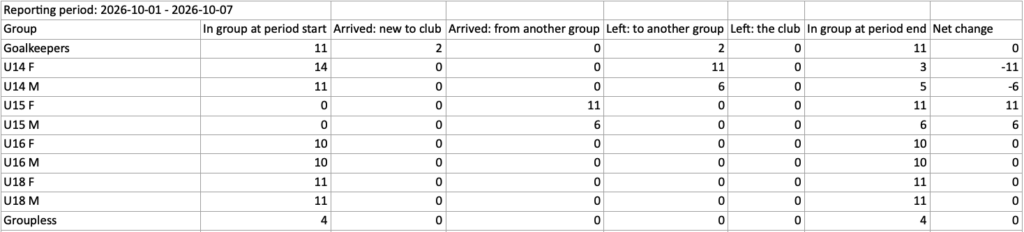
The new Group join/leave report gives you a clear picture of athlete movements over any period you choose.
This distinction matters. When an athlete leaves a training group, it doesn’t necessarily mean your club has lost a member. They may have progressed to another group within the club. The new report tracks both types of movement, helping you understand how each group contributes to your club’s growth.
What you’ll find in the report:
- Groups sheet: See how many athletes joined your club, moved between training groups or left the club, broken down by group.
- Groupless row: Find athletes who belong to your club but aren’t assigned to any training group.
- Movements sheet: See the athletes behind each number, including their names and where they moved from and to.
For example, if 10 athletes leave a beginner group, the report might show that eight progressed to advanced groups while only two left the club. That’s a very different picture from losing 10 members.
We’ve also updated the Members overview widget on the dashboard to use the same counting logic as the report.
How to download your report
- Go to Reports → Group join/leave report.
- Choose a start and end date, such as last month.
- Click Create report and open the downloaded file.
⚡ Other improvements
- Faster pages: We’ve improved loading speeds across Sportlyzer, especially on the Invoicing, Calendar, Athletes and Groups pages.
- Cash payments in INF3 reports (Estonian clubs): Cash payments are now included under the payer’s ID code. Payments missing the required information are listed on the Reports page.
- Choose who made a cash payment: When adding a cash payment, you can now select the payer — the athlete or one of their contacts. You can also update earlier payments.
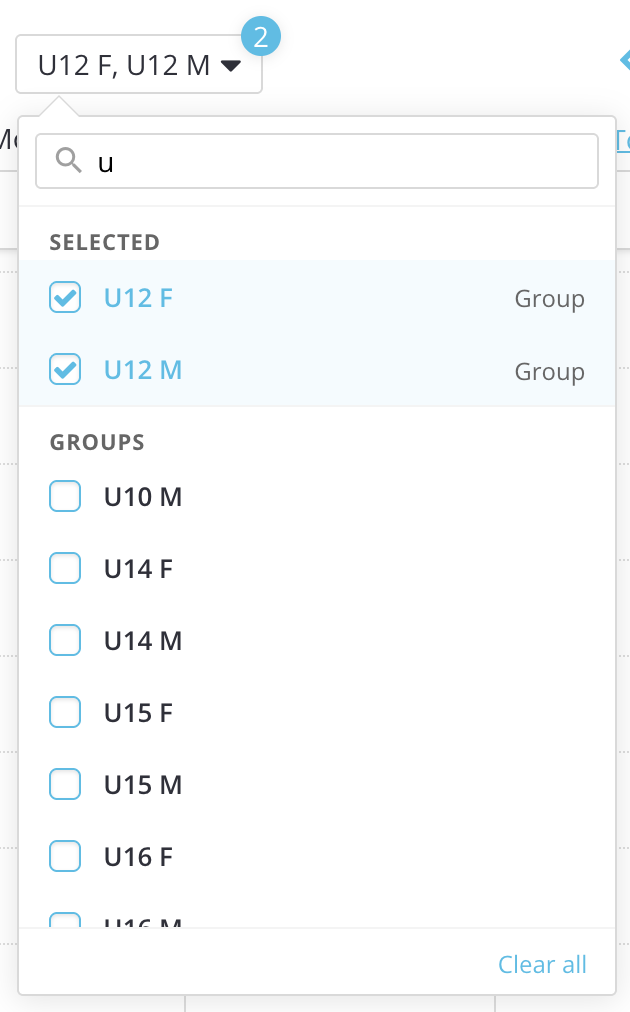
- Search calendar filters: Quickly find training groups, coaches and locations by typing in the filter. Selected items appear first and can be cleared in one click.
- Members can download documents: Athletes and parents can now download documents from their profiles, but can no longer delete them. Keep staff-only documents under Internal files.
- Clearer invoice balances: Invoice emails can now show overdue and not-yet-due amounts separately. Positive balances (credit paid in advance) also appear on invoices again.
- Calendar sync beyond December: Calendars subscribed to through Sportlyzer iCal links now show events for a full year ahead, even across year-end.
- Search locations by venue name: Find sports halls, stadiums and other venues by name when adding locations. Sportlyzer automatically fills in their address and map position.
🔧 Also fixed
Thanks to feedback from sports clubs, we’ve fixed several issues across Sportlyzer:
- Invoicing: Fixed Merit synchronization errors for Estonian clubs, custom group fee defaults for clubs using group invoicing settings, and invoicing comments not saving correctly. Send any invoices missing from Merit with To accounting.
- Athlete profiles: Fixed an issue preventing some parents and athletes from saving their profiles in the Sportlyzer Player App.
- Application forms: Required fields, including contact person addresses, are now correctly marked and validated.
- Training groups: Group start dates no longer unexpectedly reset to today after certain edits.
- Calendar: Locations are now preserved when importing competitions from Excel.
- Garmin Connect: New connections are working again. Members who couldn’t connect before can now try again.
Thank you for reporting issues and helping us improve Sportlyzer!
The Sportlyzer Team

