What’s new: group invoicing and message templates
👋 We have been quiet for a while, but we haven’t stopped improving Sportlyzer.
Here are the most important things we’ve shipped since our last update — the changes worth knowing about, followed by fixes reported by you and other clubs.
And stay tuned: we have more exciting updates on the way.
🧾 Invoicing group settings: one place for group fees and exceptions
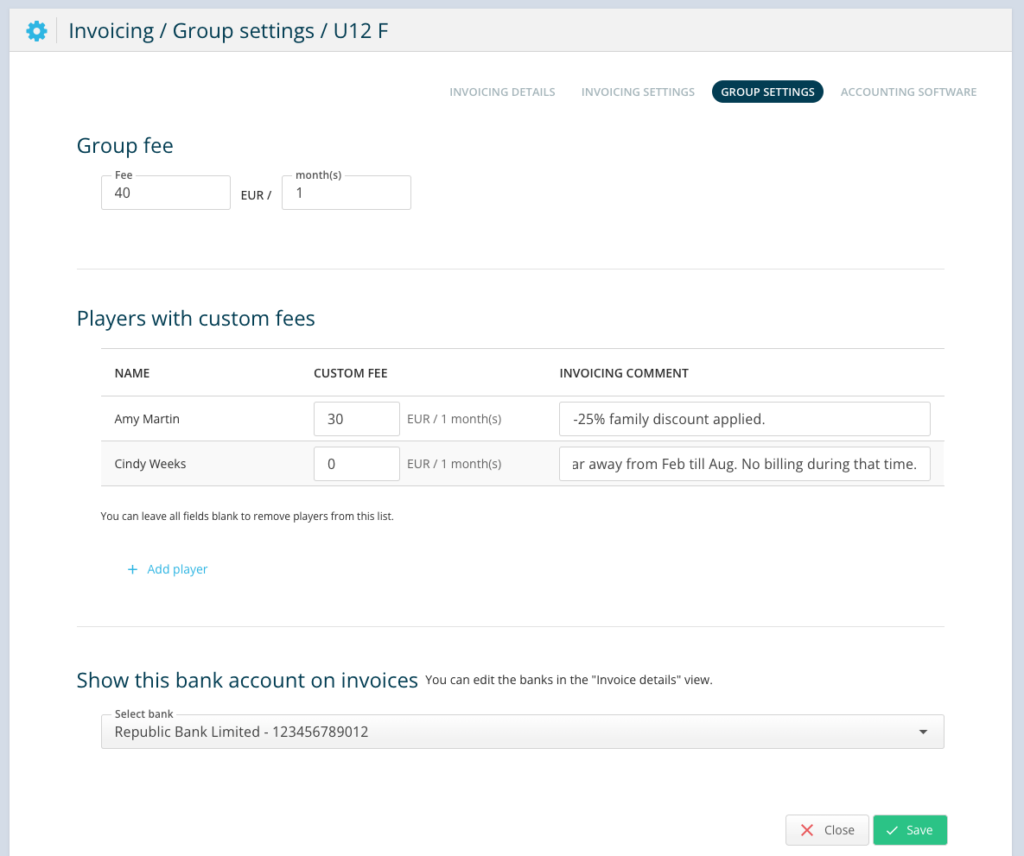
Preferences → Invoicing settings → Group settings now brings each group’s fees and individual exceptions into one place.
Set a default monthly fee for the group, then override it for athletes who have a different fee agreed. This replaces the old approach where fees could carry over from the previous month — something that could easily lead to mistakes.
You can also choose which of your club’s bank accounts appears on the invoices for each group. This is useful if your club uses separate accounts for different sections or keeps project money separate from membership fees.
The list of athletes with custom fees also shows their invoicing comments, so you can see the agreed arrangement while setting the fee.
NB! We are enabling this club by club — email us to be next.
Want to start using them?
- Email support@sportlyzer.com and ask us to enable the new Group invoicing settings
- Set the default fee for each group and add custom fees where needed
- Check the invoicing comments when setting custom fees to make sure everything is correct
Read how group fees work in invoicing
✉️ Message templates: yours and the club’s, clearly separated
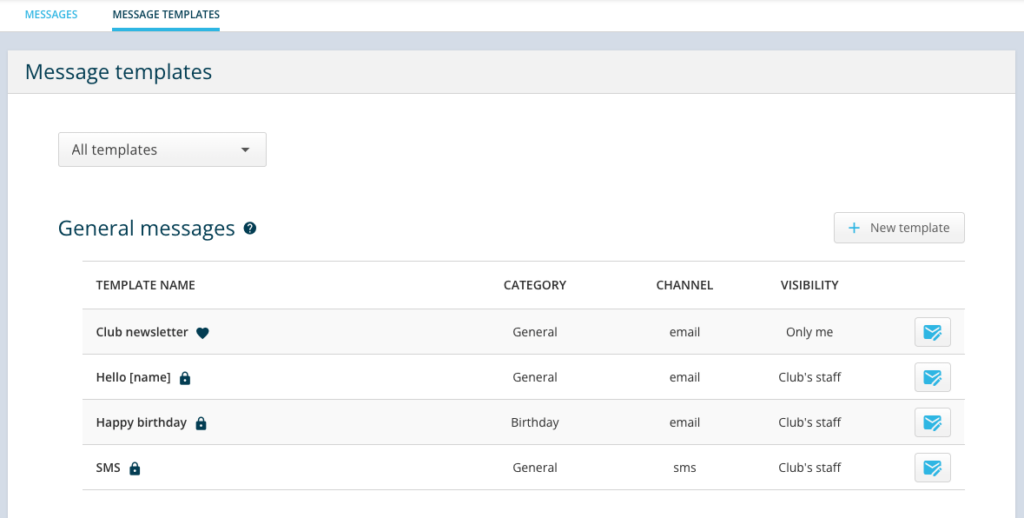
All message templates are now managed in one place, and you decide who can use each one.
Choose Only me to keep a template personal, or Club’s staff to make it available to everyone at your club. This gives every user a much cleaner overview of the templates available to them.
Sportlyzer’s original templates remain locked, but you can duplicate any of them and customize the wording. You can also mark your preferred version as a favourite. It will then be prefilled the next time you send that type of message.
Set up your templates
- Go to Messages → Message templates
- Duplicate an existing template or create one with + New template
- Customize it and choose its visibility: Only me or Club’s staff
- Mark it as a favourite if you want it prefilled automatically
⚡ Other improvements
Sportlyzer is faster
Over the past year, we’ve rebuilt much of the infrastructure behind Sportlyzer, including newer server software and a rebuilt database. The result: faster page loads across the web app.
Large exports and reports now run in the background
No need to wait on the page while a large export is being prepared. Keep working and we’ll email you a download link when it’s ready. This also means large Players reports with invoicing data can now be generated without timing out.
Invoicing summary reflects the month you are looking at
If you mark an old invoice as paid, the summary for that month updates accordingly. Keep in mind that this is a live view, not a frozen month-end snapshot. If your accounting workflow requires fixed month-end figures, reply to this email and let us know.
UPN QR codes for Slovenian clubs
Membership fee invoices now include a UPN QR code that can be scanned directly with Slovenian banking apps.
🔧 Also fixed
Many of these came directly from reports by clubs. Thank you for letting us know when something isn’t working as it should.
INVOICING
- Invoicing pages now load faster
- Edited payment amounts appear immediately without reloading the page
- The balance and debt list stays off invoices when you have disabled it
- Invoice dates can now be set to the following month, making it easier to prepare invoices in advance
- Invoicing settings are now organized into tabs instead of one long page
MESSAGES
- Reported email formatting errors have been fixed
- Coaches can email the athletes in their own groups without getting access to the whole club
- Edit & Resend now restores all original recipients
- Sending from the Android app no longer reports a failure when the message was actually sent
CALENDAR AND ATTENDANCE
- Copying last season’s recurring plan no longer creates a duplicate of every training
- The competitions filter in list view now shows all competitions
- RSVP response times are visible again in the invitee list (calendar events)
- Opening an invite link after the deadline no longer changes a Going response to Declined
- The calendar widget on club websites now loads the remaining events under View more
- New locations can once again be added directly in calendar events
ATHLETES AND FILES
- Coaches with permission to access athlete files can now download and upload files from an athlete’s profile. Deleting files and access to legal documents remain restricted to managers.
- Submitting the public join form twice no longer creates duplicate applicants and notifications
APPS AND INTEGRATIONS
- Fixed an issue where the Coach app sometimes did not show all of a user’s clubs
- Fixed several edge cases affecting Coach app login
- Fixed workout syncing from Polar Flow to the training diary
- Fixed the attendance percentage calculation in the group income widget
🔭 Coming next
Our next round of improvements focuses on making your monthly invoicing workflow less manual — from sending invoices and following up on unpaid ones to matching incoming payments.
Rather than promise features before they’re ready, we’ll show you each improvement as it lands.

